~/blog/welcome-to-microgamesware.md
Welcome to MicroGamesWare: how the site works
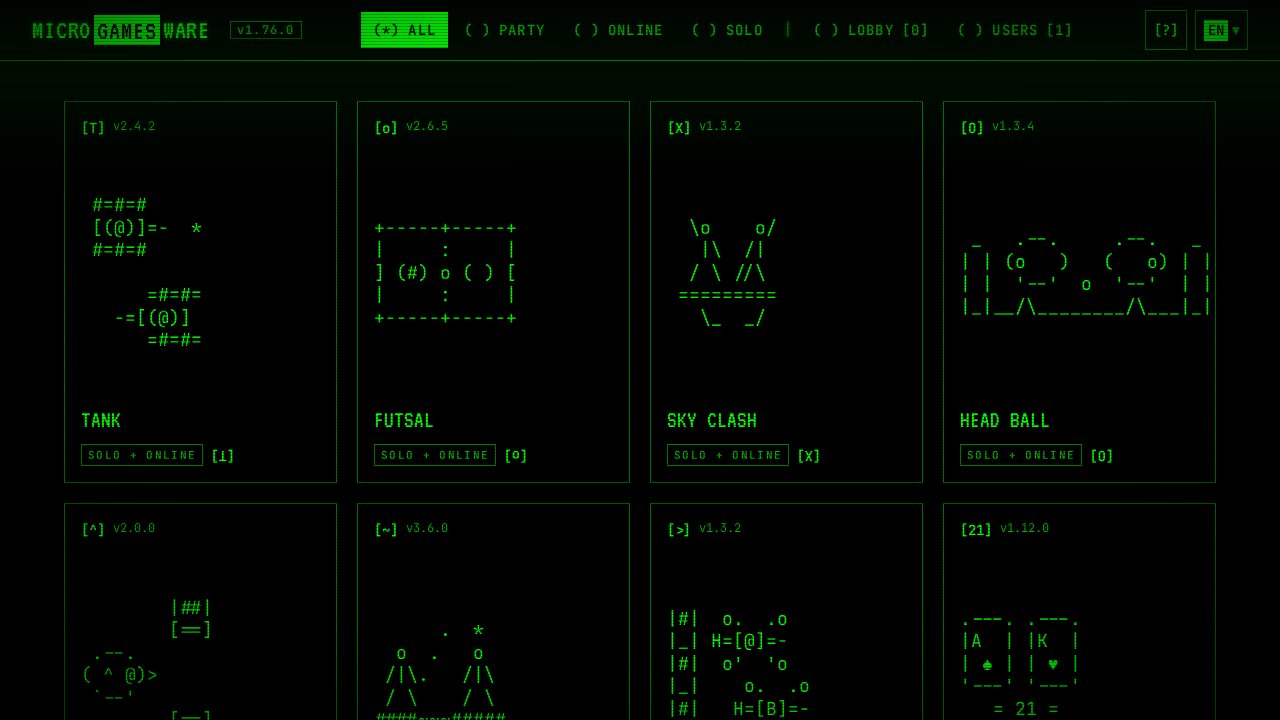
MicroGamesWare is a collection of small games you play right in your browser, on a computer or a phone. There's nothing to download and no account to make: open microgamesware.com, pick a game and you're playing.
This first post is a short tour: what's there, and how playing alone, online and as a group works.
Finding a game
The front page is a wall of game cards. The bar at the top sorts them:
- All: every game.
- Party: games for a group in the same room, best on a TV or a big screen.
- Online: games you play with others, each on their own device.
- Solo: games to play by yourself, against bots or the clock.
Many games are in more than one list. Tank, for example, works alone against bots and online with friends.
Tap a card to see what the game is about, then press [ Run ]. [<] Back takes you back to the menu.
Lost in a game? Press [?] at the top right at any time to see its rules.
On a computer the keyboard works too: 1-9 opens a game and Esc goes back.
What's in the collection
| Kind | Games |
|---|---|
| Action | Tank, Futsal, Sky Clash, Head Ball, Crater Duel, Neon Laps, Flappy |
| Party | Who is the Spy?, Vampires & Villagers, Tabu, Doodle Race, Quiz Race, Bottle Spin |
| Cards and boards | Blackjack, Chess, Dama, Sudoku |
| Puzzles | Password Hack, Number Guessing Game |
| Hanging out | Sunny Square, a 3D town square to chat in, earn coins and decorate a home of your own |
Playing with friends online
Every online game works the same way:
- One person presses Create room. Their device hosts the game.
- Everyone else presses Join room and types the 4-letter code shown on the host's screen. You can also send them the invite link, or let them scan the QR code.
- When everyone is in, the host starts the game.
In many games, bots fill the empty seats, so two people can still play a match made for eight.
The Lobby page lists the rooms that are open right now, each with its own chat, so you can find a game to jump into. The Users page shows who is on the site. Pick someone to see their profile, chat with them privately or invite them straight into a game. The chats are temporary: they're deleted as soon as either of you leaves.
Party mode: the TV and your phones
The party games really shine with everyone in one room. Open the game on a computer connected to a TV and turn on console mode. The big screen shows the game, and everyone's phone becomes their controller: a joystick and buttons in fighting and sports games, and a private screen for secret roles in games like Who is the Spy? and Vampires & Villagers.
Nobody needs to install anything. Each player just opens the site on their phone and joins with the room code.
Playing alone
Every game in the Solo list can be played by yourself: against bots you pick the number and level of, against the clock, or just at your own pace. Sudoku saves your game as you play, and Blackjack keeps your chips between visits.
Even the party games have a test mode now, so you can try Who is the Spy? or Vampires & Villagers alone at a table of bots before your friends arrive.
Your language
The site speaks English, Turkish, Russian and Kazakh. Switch from the language menu at the top right; the games, the rules and the word lists all change with it.
What's next
New games and updates are added all the time; the version number next to the logo goes up with each one. This blog is where we'll write about them: new games, big updates and stories from building them. Follow along with the RSS feed, or just come back now and then.
See you in the arcade. Pick a game and have fun!